Email Drip Campaigns Triggered by User Sentiment
Build smarter nurture sequences that respond to how users actually feel. Use sentiment signals to send the right email at the right moment.
Summary
Traditional drip campaigns follow fixed schedules regardless of user state. A frustrated user gets the same cheerful onboarding email as a delighted one. Sentiment-triggered campaigns adapt to user emotions, delivering support when frustration spikes and expansion offers when satisfaction peaks. This guide covers how to capture sentiment signals and wire them into your email automation for dramatically more effective nurture sequences.
The Problem with Time-Based Drip Campaigns
Most email automation follows a simple pattern: sign up → Day 1 email → Day 3 email → Day 7 email. This approach ignores the fundamental variable that determines email effectiveness: user state.
When Timing Fails
Consider these scenarios:
User A signs up, immediately hits a bug, and spends 30 minutes frustrated before giving up. Three days later, they receive: "Ready to explore advanced features? 🚀"
User B signs up, completes onboarding perfectly, and achieves their first win within an hour. They receive the same email at the same time.
The generic email annoys User A and underwhelms User B. Neither gets what they need.
Sentiment as the Missing Variable
Sentiment captures what timing cannot: how the user feels right now. By incorporating sentiment signals into campaign triggers, you can:
- Pause promotional emails when users are frustrated
- Accelerate success paths when users are engaged
- Trigger support outreach before users churn
- Time expansion offers to peak satisfaction moments
Capturing Sentiment Signals
Sentiment data comes from multiple sources. The more signals you capture, the more accurate your triggers become.
Direct Feedback Signals
The most reliable sentiment data comes from users directly stating how they feel:
In-app surveys:
- Post-interaction satisfaction ratings
- NPS scores at key moments
- Thumbs up/down on features
- Support ticket sentiment
Response tracking:
- Email replies indicating frustration or delight
- Survey open-ended response analysis
- Chat interaction tone
Behavioral Signals
Actions often reveal sentiment before words do:
| Behavior | Sentiment Signal |
|---|---|
| Rage clicking | Frustration |
| Rapid feature exploration | Engagement/curiosity |
| Session abandonment after error | Frustration |
| Sharing/inviting teammates | Satisfaction |
| Multiple support ticket submissions | Frustration |
| Feature completion + return visit | Success/satisfaction |
| Pricing page visits without conversion | Hesitation/evaluation |
Derived Signals
Combine multiple data points into composite sentiment scores:
Engagement health score:
- Login frequency + feature usage + task completion = overall engagement
- Declining trend = potential dissatisfaction
- Rising trend = growing satisfaction
Support interaction score:
- Ticket volume + resolution satisfaction + response sentiment
- High volume + low satisfaction = at-risk user
Designing Sentiment-Triggered Campaigns
Move from scheduled sequences to responsive workflows.
The Sentiment-Based Email Framework
Replace time-based triggers with sentiment-based ones:
Traditional approach:
Day 1 → Welcome email
Day 3 → Feature highlight
Day 7 → Success story
Day 14 → Upgrade prompt
Sentiment-based approach:
Signup → Welcome email
First success → Feature highlight (whenever it happens)
Satisfaction score > 8 → Success story request
Engagement peak + 7 days sustained → Upgrade prompt
Frustration spike → Support outreach
Essential Sentiment-Triggered Emails
The Rescue Email
- Trigger: Frustration signal detected (rage clicks, error encounters, negative survey response)
- Content: Proactive support offer, relevant help article, direct line to support
- Timing: Within 1-2 hours of signal
The Momentum Email
- Trigger: User completes key milestone with positive indicators
- Content: Celebration, next steps guidance, social proof of continued success
- Timing: Immediately after achievement
The Re-Engagement Email
- Trigger: Previously engaged user shows declining activity + no negative signals
- Content: "We miss you" + personalized value reminder + low-friction return action
- Timing: After 7 days of declining engagement
The Expansion Email
- Trigger: High satisfaction score + usage approaching limits
- Content: Upgrade benefits focused on their specific usage patterns
- Timing: At satisfaction peak, before frustration from limits
The Advocacy Ask
- Trigger: Very high satisfaction + successful outcome achieved
- Content: Review request, referral program, testimonial opportunity
- Timing: 24-48 hours after peak satisfaction moment
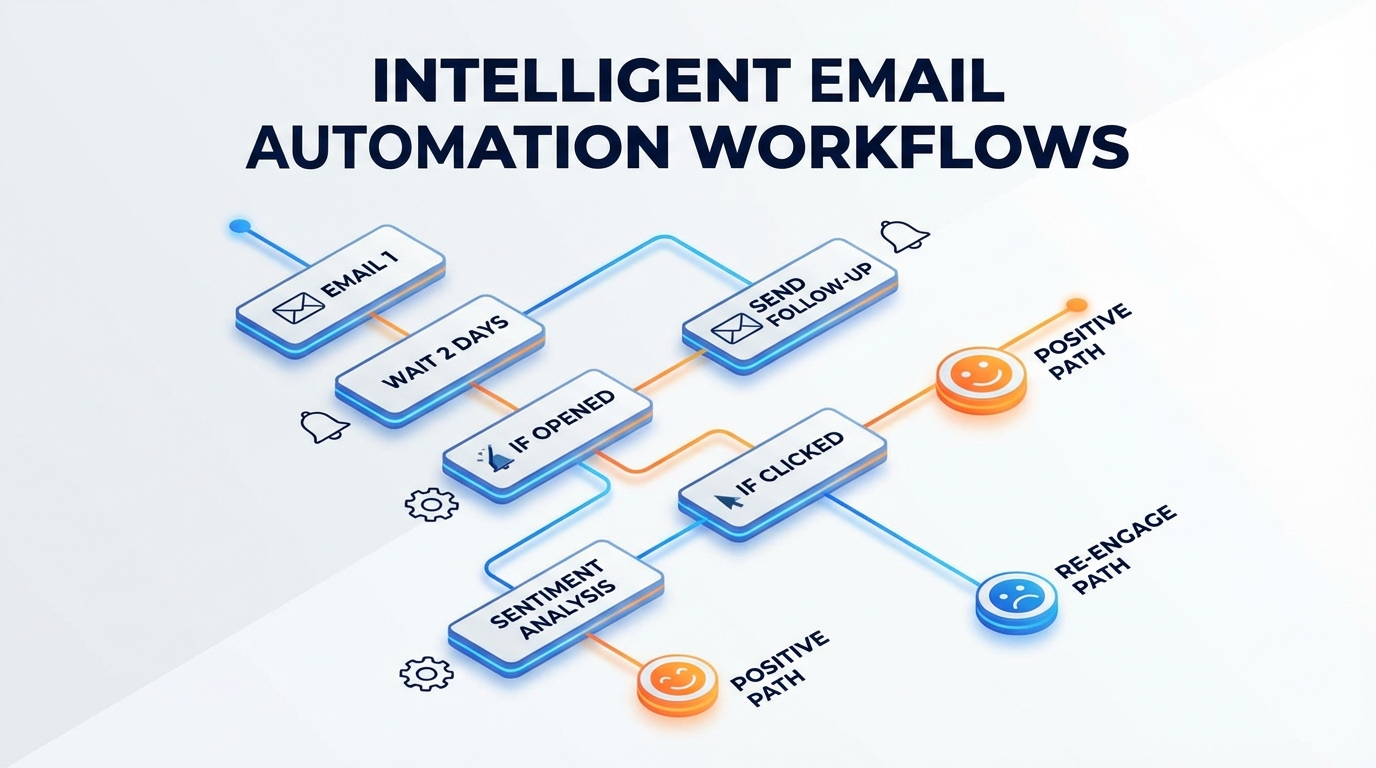
Branching Logic Design
Build campaigns with sentiment-based branches:
[User Signs Up]
    ↓
[Welcome Email - Day 0]
    ↓
[Monitor for 3 days]
    ↓
[Sentiment Check]
    ├── Frustration Detected → [Rescue Sequence]
    │       ↓
    │   [Support Email]
    │       ↓
    │   [48hr check: Resolved?]
    │       ├── Yes → [Return to Main]
    │       └── No → [Escalation Email]
    │
    ├── Success Detected → [Accelerated Sequence]
    │       ↓
    │   [Advanced Feature Email]
    │       ↓
    │   [Expansion Opportunity Email]
    │
    └── Neutral → [Standard Sequence]
            ↓
        [Feature Highlight Email]
            ↓
        [Continue monitoring...]
Building Sentiment Scoring Systems
Quantify sentiment for reliable automation triggers.
Simple Sentiment Score Model
Create a -100 to +100 sentiment scale:
Positive signals (add points):
- Positive survey response: +20
- Feature completion: +10
- Return visit within 24hr: +5
- Team member invited: +15
- Support ticket resolved + positive rating: +10
Negative signals (subtract points):
- Negative survey response: -25
- Error encountered: -5
- Rage clicking detected: -15
- Support ticket submitted: -10
- Session abandonment after error: -10
Score interpretation:
- Above +50: Highly satisfied (expansion opportunity)
- +20 to +50: Satisfied (nurture normally)
- -20 to +20: Neutral (monitor closely)
- -50 to -20: At risk (support outreach)
- Below -50: Critical (immediate intervention)
Decay and Recency
Sentiment changes over time. Implement decay:
- Recent signals weighted more heavily
- Positive signals decay slower than negative
- Major events (both positive and negative) have longer half-lives
Example decay formula:
signal_weight = base_weight × (0.9 ^ days_since_signal)
Segment-Specific Scoring
Different user segments have different baselines:
- Power users: Higher activity threshold for "engaged" status
- Casual users: Lower activity expected, adjust sensitivity
- Enterprise: Team-level aggregation, not just individual
- New users: Weight early signals more heavily
Integration Architecture
Connect sentiment signals to email platforms.
Data Flow Design
[App Events] → [Event Stream] → [Sentiment Engine] → [Email Platform]
     ↓                              ↓
[Survey Responses]              [Score Storage]
     ↓                              ↓
[Support Tickets]              [Trigger Rules]
Event Taxonomy
Standardize events for consistent processing:
{
  "event_type": "sentiment_signal",
  "user_id": "usr_123",
  "signal_type": "survey_response",
  "signal_value": 8,
  "signal_context": {
    "survey_type": "nps",
    "feature": "dashboard",
    "session_id": "sess_456"
  },
  "timestamp": "2026-01-15T10:30:00Z"
}
Email Platform Integration
Most email platforms support custom event triggers:
Webhook approach:
- Sentiment engine calculates score
- Score crosses threshold → webhook to email platform
- Email platform triggers appropriate sequence
Direct integration:
- Push sentiment score as user property
- Email platform filters by sentiment property
- Sequences trigger based on property values
Measuring Campaign Effectiveness
Track whether sentiment-triggered campaigns outperform traditional approaches.
A/B Testing Framework
Run controlled tests comparing:
- Traditional time-based campaigns vs. sentiment-triggered
- Different sentiment thresholds for triggers
- Various email content for same sentiment state
Test metrics:
- Open rate by sentiment state
- Click rate by sentiment state
- Conversion rate by campaign type
- Churn rate between test groups
Sentiment-Specific Metrics
Track metrics per sentiment state:
| Sentiment State | Key Metrics |
|---|---|
| High satisfaction | Expansion conversion, referral rate |
| Neutral | Progression to positive, activation rate |
| Frustration | Recovery rate, churn prevention |
| Critical | Save rate, time to resolution |
Long-Term Impact
Beyond immediate email metrics, track:
- Customer lifetime value by campaign exposure
- Net sentiment change over customer lifecycle
- Support ticket volume reduction from proactive outreach
- Expansion revenue attributed to sentiment-timed offers
Advanced Techniques
Predictive Sentiment
Don't just react to current sentiment—predict future state:
- Users with declining engagement scores likely to become frustrated
- Users with rising engagement likely to become advocates
- Trigger campaigns based on predicted future sentiment
Sentiment Cohort Analysis
Group users by sentiment trajectory, not just current state:
- "Recovered": Were frustrated, now satisfied
- "Declining": Were satisfied, trending negative
- "Stable positive": Consistently satisfied
- "Volatile": Frequent sentiment swings
Each cohort needs different nurture strategies.
Multi-Channel Sentiment Response
Extend beyond email:
- Very frustrated users → trigger in-app support chat
- High satisfaction → trigger in-app testimonial request
- Critical state → trigger phone outreach from success team
Common Pitfalls
Over-Automation
Not every sentiment signal needs an email response. Set minimum thresholds and cooling periods to avoid overwhelming users.
Guidelines:
- Maximum one sentiment-triggered email per week per user
- Minimum 48 hours between any two emails
- Manual review queue for critical-state interventions
False Positive Triggers
Single signals can mislead. A user might rage-click once because their mouse stuck, not because they're frustrated.
Mitigation:
- Require multiple signals or sustained patterns
- Weight signals by reliability
- Build in human review for high-stakes actions
Ignoring Segment Differences
Enterprise users and consumer users signal sentiment differently. A quiet enterprise user isn't necessarily unhappy—they might just be busy.
Solution:
- Segment-specific scoring models
- Segment-specific trigger thresholds
- Segment-appropriate email content and tone
Privacy Considerations
Sentiment tracking raises privacy questions. Be transparent:
- Disclose data collection in privacy policy
- Allow users to opt out of behavioral tracking
- Don't reference specific tracked behaviors in emails ("We noticed you rage-clicked...")
Key Takeaways
- Time-based campaigns ignore user state: Sentiment triggers ensure relevance
- Multiple signal sources improve accuracy: Combine surveys, behavior, and support data
- Quantify sentiment for automation: Scoring systems enable reliable triggers
- Design branching sequences: Different sentiment states need different content
- Measure by sentiment state: Track effectiveness for each emotional context
- Avoid over-automation: Set limits to prevent email fatigue
User Vibes OS captures real-time sentiment signals and integrates with your email platform for intelligent nurture sequences. Learn more.
Related Articles
Automated Testimonial Collection: Timing and Targeting
Systematically capture testimonials by reaching happy users at the right moment. Build a testimonial engine that runs on autopilot.
Real-Time Sentiment Dashboards for Product Teams
Build dashboards that show user mood as it happens, not weeks later in reports. Monitor sentiment at scale and respond before problems escalate.
Freemium to Premium: Feedback-Driven Conversion Strategies
Use targeted feedback collection to understand why free users don't upgrade, then address those barriers systematically. Convert more trials with data.
Written by User Vibes OS Team
Published on January 15, 2026