Onboarding Feedback Loops: Catching Confusion Before It Becomes Churn
Tactical guide to collecting feedback during the critical first 7 days. Learn where to ask, what to ask, and how to act fast to prevent early churn.
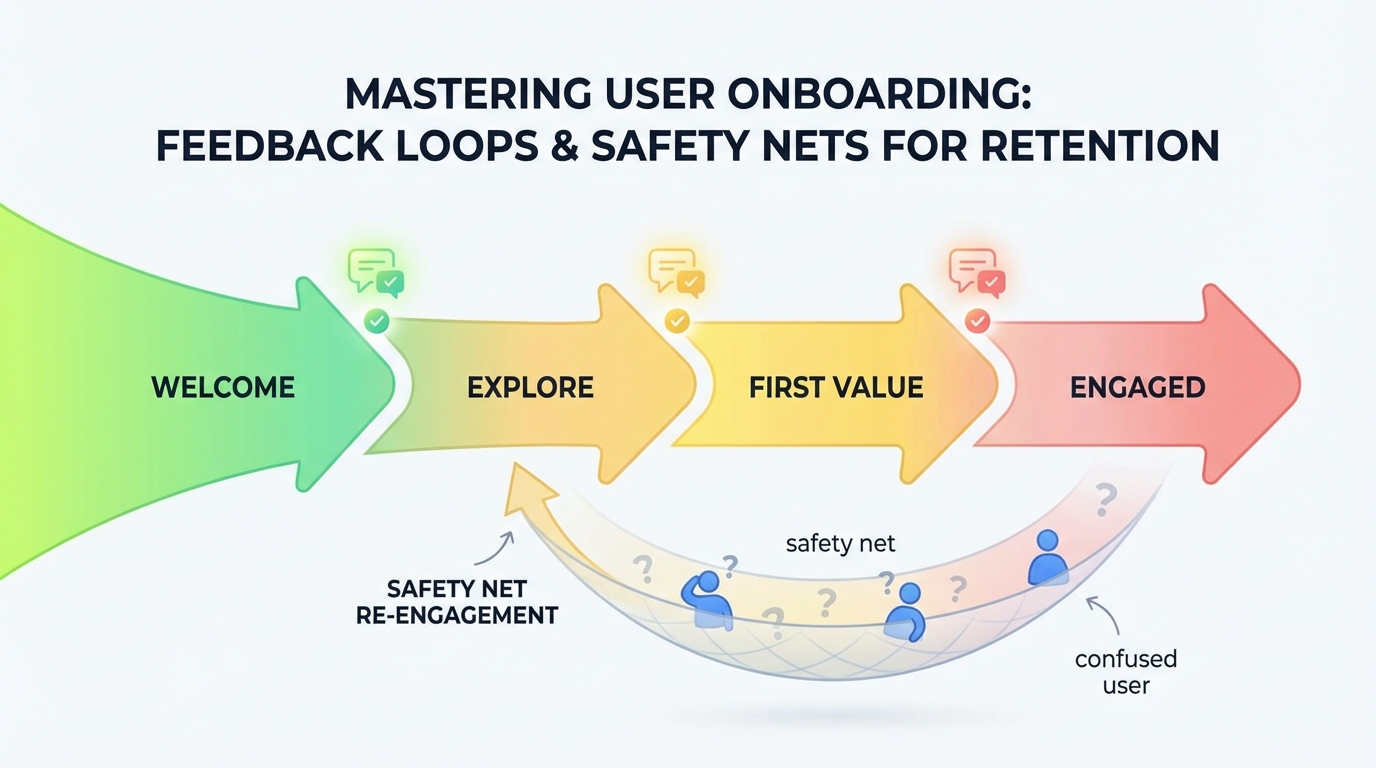
Summary
The first seven days determine whether users become customers or churn statistics. Yet most companies wait until after onboarding to ask for feedback—far too late to salvage confused users. This guide covers tactical approaches to real-time onboarding feedback collection, identifying confusion as it happens, and rapid intervention strategies that recover at-risk users before they abandon.
The First Seven Days Problem
User onboarding is a leaky funnel. At every step, users drop off:
| Onboarding Stage | Typical Drop-off |
|---|---|
| Signup → First login | 20-30% |
| First login → Core action | 30-40% |
| Core action → Second session | 25-35% |
| Second session → Week 1 retention | 20-30% |
Compounded, this means only 20-35% of signups remain active after one week. Most of the lost users aren't bad fits—they're confused, stuck, or distracted.
Why Early Confusion Compounds
Confusion in onboarding creates cascading problems:
Immediate: User can't complete setup, gives up for now Day 2: Returns, still stuck, frustration builds Day 3-5: Gives up trying, explores alternatives Day 7+: Mentally moved on, credit card charge triggers cancellation
Every hour of unresolved confusion increases churn probability. By the time you send a "how's it going?" email on day 7, it's often too late.
The Feedback Timing Gap
Traditional feedback timing misses the critical window:
| Feedback Type | Typical Timing | Problem |
|---|---|---|
| Welcome survey | Signup | Too early—hasn't used product yet |
| NPS survey | Day 30 | Too late—already churned or committed |
| CSAT survey | After support | Reactive—only captures escalated issues |
| Onboarding survey | Day 7 | Survivors only—missed the churned users |
Real-time feedback during onboarding fills this gap.
Designing Onboarding Feedback Touchpoints
Strategic touchpoints capture feedback when it matters most.
Touchpoint 1: Post-Signup Intent
When: Immediately after signup, before product access
Purpose: Understand goals to personalize experience and measure expectation alignment
Questions:
- What's the main thing you're hoping to accomplish?
- How did you hear about us?
- What's your role?
Format: 2-3 quick multiple choice or short text
Why it works: Users have momentum from signup decision. Capturing intent enables personalization and sets expectations.
Touchpoint 2: First Action Completion
When: After completing the first meaningful action (varies by product)
Purpose: Gauge initial experience while it's fresh
Questions:
- How easy was it to [complete first action]? (1-5 scale)
- Did anything surprise you?
- What would have made this easier?
Format: Quick rating + optional text
Why it works: They've just experienced your core value. Feedback is specific and fresh.
Touchpoint 3: First Friction Point
When: When user shows signs of struggle (time on page, repeated actions, errors)
Purpose: Offer help before frustration leads to abandonment
Questions:
- Need help with this step?
- What are you trying to do?
- [Contextual options based on page]
Format: Proactive offer, not survey
Why it works: Intervenes at the moment of confusion rather than after abandonment.
Touchpoint 4: Session End Without Completion
When: User is about to leave without completing onboarding
Purpose: Understand blockers and offer recovery path
Questions:
- Did you find what you needed?
- What stopped you from finishing?
- Can we help you complete setup?
Format: Exit-intent modal, low friction
Why it works: Captures feedback from users who would otherwise vanish silently.
Touchpoint 5: Day 3 Check-In
When: Three days after signup (if still onboarding)
Purpose: Re-engage users who stalled and understand why
Questions:
- You started setting up [product]—need any help finishing?
- What's getting in the way?
- [Offer: schedule quick call / send tutorial / nothing]
Format: Email or in-app message
Why it works: Three days is long enough to identify stalled users but soon enough to recover them.
Touchpoint 6: First Week Summary
When: Day 7 (for users who completed onboarding)
Purpose: Assess overall experience and identify improvement opportunities
Questions:
- How would you rate your setup experience? (1-5)
- What was the hardest part?
- What would have made it better?
- How confident are you in using [product] now?
Format: Short email survey or in-app
Why it works: Captures comprehensive feedback from successful onboarders to improve for future users.
Real-Time Confusion Detection
Don't wait for users to report confusion—detect it.
Behavioral Signals
Monitor actions that indicate struggle:
| Signal | What It Indicates | Threshold |
|---|---|---|
| Repeat clicks on same element | UI confusion | 3+ in 10 seconds |
| Long time on single step | Stuck or reading | > 2 minutes |
| Back-and-forth navigation | Lost or comparing | 4+ reversals |
| Form field corrections | Input confusion | 3+ edits same field |
| Help icon hover/click | Seeking assistance | Any |
| Error messages | Technical issue | Any |
Session Replay Integration
For users showing struggle signals:
- Flag session for review
- Trigger proactive help offer
- Queue for follow-up if they abandon
Rage Click Detection
Rapid repeated clicks indicate severe frustration:
let clicks = [];
document.addEventListener('click', (e) => {
  const now = Date.now();
  clicks = clicks.filter(t => now - t < 2000);
  clicks.push(now);

  if (clicks.length >= 5) {
    triggerFrustrationIntervention();
  }
});
When detected: Immediately offer help or open support chat.
Rapid Response Playbooks
Detecting confusion means nothing without fast response.
Automated Interventions
Configure instant responses to common signals:
Signal: User stuck on integration step > 3 minutes Response: Slide-in offering integration guide or live help
Signal: User abandons during billing setup Response: Email within 1 hour addressing common billing questions
Signal: User completes setup but doesn't return within 48 hours Response: Personal email from success team with quick-start tips
Human Escalation Triggers
Some situations need human intervention:
| Trigger | Escalation |
|---|---|
| High-value signup stuck | Immediate CSM outreach |
| Multiple rage click sessions | Support ticket auto-created |
| Negative feedback + exit | Manager notification |
| Repeat failures on same step | Engineering alert for possible bug |
Response Time Targets
| Issue Severity | Target Response | Channel |
|---|---|---|
| Critical (can't proceed) | < 1 hour | In-app + email |
| High (major friction) | < 4 hours | |
| Medium (minor confusion) | < 24 hours | |
| Low (suggestion) | Next batch | Product feedback log |
Closing the Loop During Onboarding
Users who provide feedback should see action.
Immediate Acknowledgment
Every feedback submission deserves acknowledgment:
Good: "Thanks for letting us know. Here's a guide that might help with [issue]."
Better: "Thanks! I see you're on the [specific step]. Here's exactly what to do next: [contextual guidance]."
Contextual Help Delivery
Based on feedback content, provide targeted assistance:
| Feedback Theme | Automated Response |
|---|---|
| "Confused about X" | Link to X tutorial + offer live walkthrough |
| "Can't find Y" | Direct link to Y + navigation tip |
| "Error when Z" | Known issue acknowledgment + workaround |
| "Missing feature" | Roadmap status if known, otherwise logged |
Follow-Up Confirmation
After providing help, confirm resolution:
24 hours later:
"You mentioned trouble with [issue] yesterday. Did the guide help? Let me know if you're still stuck."
This shows you're paying attention and catches unresolved issues.
Metrics for Onboarding Feedback Programs
Measure program effectiveness, not just onboarding metrics.
Feedback Program Metrics
| Metric | Target | Why It Matters |
|---|---|---|
| Touchpoint response rate | 25%+ | Program reach |
| Time to feedback response | < 4 hours | Responsiveness |
| Issue resolution rate | 80%+ | Help effectiveness |
| Repeat feedback (same user) | < 20% | Issue actually resolved |
Onboarding Impact Metrics
| Metric | Baseline | With Feedback Loop |
|---|---|---|
| Day 7 activation rate | 35% | Target: 50%+ |
| Time to first value | 3 days | Target: < 1 day |
| Onboarding completion rate | 45% | Target: 65%+ |
| Early churn (< 30 days) | 30% | Target: < 20% |
Segmented Analysis
Compare metrics between:
- Users who received interventions vs. those who didn't
- Users who gave feedback vs. silent users
- Different onboarding paths or cohorts
This reveals which interventions actually help.
Common Onboarding Feedback Mistakes
Avoid these pitfalls.
Too Many Questions
Problem: Long surveys during onboarding add friction to an already-fragile flow.
Solution: Maximum 1-2 questions per touchpoint. Save comprehensive surveys for day 7+.
Wrong Timing
Problem: Asking "how's your experience?" before they've had one.
Solution: Trigger feedback after meaningful actions, not arbitrary time delays.
No Action Capability
Problem: Collecting feedback without the ability to act on it immediately.
Solution: Build response playbooks before launching collection. If you can't respond, don't ask.
Ignoring Silent Strugglers
Problem: Only hearing from users who actively report issues.
Solution: Use behavioral signals to detect confusion in users who don't speak up.
One-Size-Fits-All
Problem: Same onboarding and same feedback for all user types.
Solution: Segment onboarding by role, use case, or intent captured at signup.
Key Takeaways
-
The first seven days are make-or-break: Most churn decisions form in week one. Waiting until day 30 to ask for feedback misses the critical window.
-
Strategic touchpoints beat random surveys: Place feedback requests after meaningful actions—post-signup intent, first completion, session end, and day 3/7 check-ins.
-
Detect confusion behaviorally: Repeated clicks, long page times, back-and-forth navigation, and rage clicks reveal struggle before users report it.
-
Response speed matters: Target < 1 hour for critical issues, < 4 hours for high friction. Slow responses let users churn before you can help.
-
Close the loop immediately: Acknowledge feedback, provide contextual help, and follow up to confirm resolution. Show users their feedback matters.
-
Measure feedback program effectiveness: Track response rates, resolution rates, and impact on activation metrics. Iterate based on data.
-
Avoid survey fatigue during onboarding: Keep touchpoints to 1-2 questions maximum. Save comprehensive feedback for users who've survived the first week.
User Vibes OS helps you collect real-time onboarding feedback and intervene before confused users churn. Learn more.
Related Articles
Reducing Time to Value: Using Feedback to Accelerate User Activation
How feedback at key activation moments identifies blockers and guides users to their 'aha moment' faster. Cut time-to-value by 40%.
Feedback for Developer Tools: Unique Challenges of Collecting from Technical Users
Developers hate surveys but love fixing problems. Learn how to collect actionable feedback from technical users through GitHub issues, API logs, and community channels.
Feedback During Incidents: Turning Downtime and Outages into Improvement Opportunities
How to collect and use feedback during service disruptions. Balance communication, gather impact data, and emerge with stronger customer relationships and clearer priorities.
Written by User Vibes OS Team
Published on January 12, 2026